


20 key schema tags that helped our client’s ecommerce websites rank higher


We built an amazing e-commerce website for our clients, but quickly realized we hadn’t fully leveraged the SEO tactics to rank high in search engine result snippets. That’s when our SEO team took charge, conducted in-depth research, and decided to play around schema tags structured data. We’re confident this was the key to winning the search engine game.
The effort does not fail us, we are super happy and glad to share our strategy and what helped our clients to rank higher on SERPs.
2. Aggregate Rating Schema Type
3. Price Currency and Price Schema Type
4. Merchant Return Policy Schema Type
5. Price Valid Until Schema Type
10. Expiration Date Schema Type
11. Additional Type Schema Type
13. Negative Notes Schema Type
14. Positive Notes Schema Type
15. Alternate Name Schema Type
18. Country of Origin Schema Type
19. Has Certificate Schema Type
🚀How these tags enhance live search results
🚀How to Implement Schema Markup
🚀 Before we dive in, let’s first understand what Schema Markup is!
Schema markup is a form of structured data that helps search engines understand the content on your website.
We all communicate using a particular language, but search engines don’t understand the way we speak, right? That’s where Schema Markup comes in. It helps search engines interpret our content more effectively. Schema markup is written in different schema markup languages, such as JSON-LD, Microdata, or RDFa—with JSON-LD being the most popular and Google-recommended choice.
Fix Your Schema Setup
🚀 We have handpicked 20 Schema tags and implemented on Our Clients’ E-commerce Websites
1. SKU Schema Type
Every human has a nickname, right? It’s something unique that helps others identify them easily. Just like that, every product can have its own unique nickname too, and we call it SKU (Stock Keeping Unit). This tag plays a crucial role in helping search engines and users differentiate between products.
What’s the Role of SKU in Schema?
The SKU Schema Tag allows you to assign a distinct identifier to each product, making it easier for search engines to understand and categorize items.
Here’s what it does:
- Differentiates Products: Even if products look or sound similar, their SKUs keep them distinct.
- Enhances Search Visibility: Customers searching for specific SKUs can find the exact product faster.
- Improves Inventory Management: It’s a lifesaver for businesses managing multiple products.
- Builds Trust: Displaying SKUs in search results makes customers feel confident they’ve found the right item.
For Example, Imagine you’re selling two similar-looking pairs of black shoes on your website:
- One is casual (SKU: BLK-CAS-001)
- The other is formal (SKU: BLK-FRM-002)
In short, SKU is like a product’s unique nickname, and using it wisely can make a big difference in search visibility and customer satisfaction!
2. Aggregate Rating Schema Type
Now, Imagine you’re searching for a Bluetooth speaker under ₹5,000. Among the search results, you see two options:
- Product A: ₹4,999 | ⭐ 4.7 (1,200 reviews)
- The snippet shows the price, average rating, and number of reviews, all in one glance.
- Product B: ₹4,800 (no ratings or reviews shown).
Even though Product B is slightly cheaper, you’re more inclined to click on Product A because the rating and review count create trust.
Refer the Example Code below:
“aggregateRating”: {
“@type”: “AggregateRating”,
“ratingValue”: “4.5”,
“reviewCount”: “134”
}
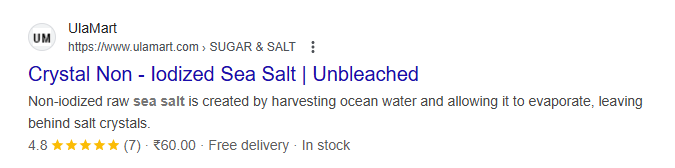
Screenshot 1:
Screenshot 2:
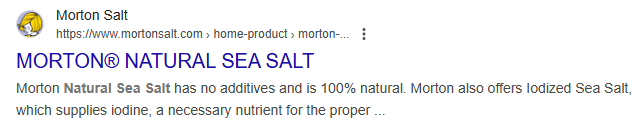
Take a look at the screenshot above from UlaMart Organic Online Store , and you’ll notice a clear difference between the two websites. The first one stands out because it displays ratings and reviews directly alongside the product. It’s the kind of detail that immediately grabs attention, isn’t it?
Here’s the secret: This enhanced visibility is achieved by implementing the “aggregateRating” schema tag.
3. Price Currency and Price Schema Type
Imagine you’re browsing online for a pair of shoes. You find a product listed at ₹2,000 on an Indian website. But let’s say you’re unsure whether the price is in INR (Indian Rupees) or USD (U.S. Dollars) because no currency symbol is visible.
This is where the PriceCurrency and Price schema tags play an essential role. By using these schema tags, the website can specify exactly what currency is being used (INR in this case) and the price (₹2,000).
For instance:
- Price schema: ₹2,000 (The cost of the shoes).
- PriceCurrency schema: INR (The currency is Indian Rupees).
Now, when search engines show this product in search results, they display the exact price in the correct currency, like ₹2,000 for Indian customers, and for someone searching in the US, it could show something like $27 (depending on the exchange rate).
The use of these schema tags ensures that customers know exactly what they’re paying and in what currency, making the purchase process more transparent and reducing confusion.
In short, these tags help customers feel more confident about the price displayed in the search result, without having to click into the website for more details.
Key Points to Remember:
- Use ISO 4217 currency codes (e.g., INR for Indian Rupees, USD for American Dollars).
- Ensure prices reflect local market values.
Refer the Example Code below:
“priceCurrency”: “MX$”,
“price”: “164.60”
Screenshot 1:

Screenshot 2:
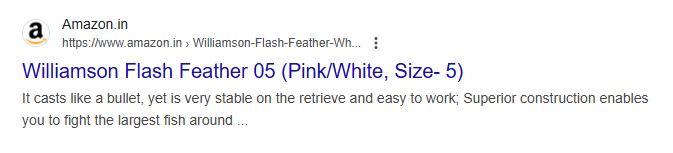
Looking at the screenshot above, the difference is pretty obvious—The first one shows the price of the product, while the second doesn’t. This highlights exactly why implementing the price Currency and price schema tag on your website is so important.
Now, which one would you choose?
Of course, the Curricanes site. Every customer wants products or services to be informative. Naturally, most customers will prefer the first site because it provides detailed information right in the search snippet, giving them what they need even before clicking on the website.
Although Amazon has high Domain Authority and a vast number of Backlinks, it can sometimes fall short in providing detailed information for customers. This highlights the value of using Schema tags to ensure customers have all the information they need to make well-informed decisions.
4. Merchant Return Policy Schema Type
Imagine you’re shopping online for a head massager. You’ve heard great things about the product but can’t be sure if it will meet your expectations. After all, you’re looking for a product that mimics the softness and feel of a real massage, right? Now, how do you know it will live up to the hype? If it doesn’t meet your expectations, you’d probably want to return it, right?
That’s where the Merchant Return Policy Schema Type comes in. It’s a game-changer for online shopping. Without it, you might not know if you can return the product easily until after you’ve purchased it. But with this schema tag, the return policy is displayed right in the search results—giving you peace of mind before you even click to buy.
For example
- Return Policy schema: “30-day return policy”
- Return Window schema: “Return within 30 days for a full refund”
This allows customers to quickly check if the product is returnable and what the conditions are, right from the search snippet. So, if you’re not 100% happy with the product, you’ll know upfront that you can return it within a specific time frame.
This helps boost customer confidence, making them feel secure in their purchase. Plus, it can increase the likelihood of a sale.
Refer the Example Code below:
“hasMerchantReturnPolicy”: {
“@type”: “MerchantReturnPolicy”,
“returnPolicyCategory”: “FreeReturn”,
“returnPolicySeasonalOverride”: [
{
“@type”: “ReturnPolicySeasonalOverride”,
“returnPolicyStartDate”: “2025-01-01”,
“returnPolicyEndDate”: “2025-01-07”,
“merchantReturnDays”: “P07D”
}
]
}
Key Points to Remember:
- Use ISO 8601 format for durations (e.g., P30D for 30 days).
- Specify seasonal return policy overrides if applicable.
- Other Examples:
P1Y: 1 year
P2M: 2 months
P10D: 10 days
P3W: 3 weeks - This format ensures clarity and consistency when specifying time-related data in structured data.
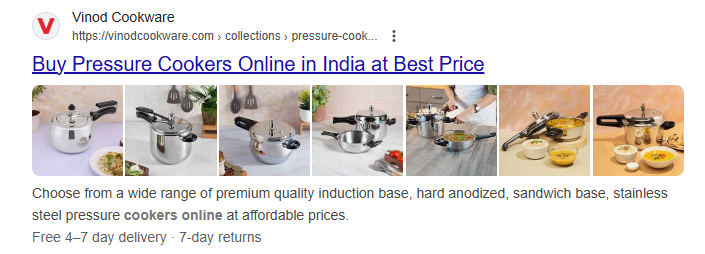
Screenshot 1:
Screenshot 2:
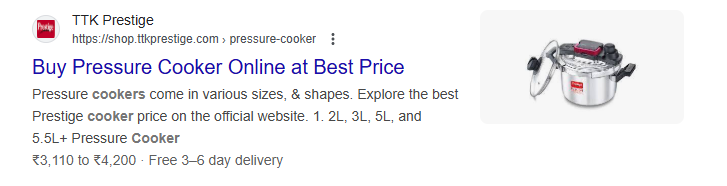
If you take a close look at the screenshot above, you’ll notice something important—the first image includes the return policy for the product, but the second one is missing it. This subtle difference really emphasizes why incorporating the Merchant Return Policy schema tag on your site is essential.
5. Price Valid Until Schema Type
Let’s Imagine that you’re shopping for a smartphone on an e-commerce website. You see a great deal, but you’re unsure if the price will stay the same by the time you make your purchase. With the Price Valid Until schema, the exact date when the offer expires is displayed in the search results, so you know exactly how long the deal is valid. This can give you the confidence to either buy it now or wait until the last minute!
Did you know? This Schema tag uses the ISO 8601 date format (YYYY-MM-DD) by default, the global standard for date representation in structured data. Using this format ensures consistency, readability, and compatibility with search engines and other data processors.
We Made This Mistake—Don’t Let It Happen to You!
We didn’t realize it at first, that we made a mistake in the date format. but then our SEO expert caught it and fixed it. So, here’s a pro tip: stick to the ISO 8601 format (YYYY-MM-DD) for dates. Search engines and data processors are designed to recognize this format, and changing it could lead to errors or misinterpretations. Keep it simple, keep it standard!
The Correct Usage (ISO 8601 Format) is “2025-12-31 (YYYY-MM-DD)”.
Refer the Example Code Below:
“priceValidUntil”: “2025-12-31”
Live Result Example: Search snippet displaying: Offer valid until December 31, 2025.
6. Color Swatch Schema Type
Imagine you’re browsing online for a t-shirt. You’ve found the perfect design and size, but your favorite color isn’t listed. Would you still buy it? Probably not! That’s why the ColorSwatch schema is a game-changer—it displays all the available color options, making shopping easier and more enjoyable.
Refer the Example Code Below:
“colorSwatch”: [
{
“name”: “black”,
“colorCode”: “#FF5733”, // Hex value for the color.
“url”: “https://example.com/product?color=black”, // Link to the specific product with the selected color.
“image”: “https://example.com/images/red_swatch.jpg” // Optional image for the color swatch.
},
{
“name”: “red”,
“colorCode”: “#33A8FF”,
“url”: “https://example.com/product?color=red”,
“image”: “https://example.com/images/blue_swatch.jpg”
},
]
Not just that, this tag links directly to each color variant, ensuring a seamless user experience.
Example Snapshot
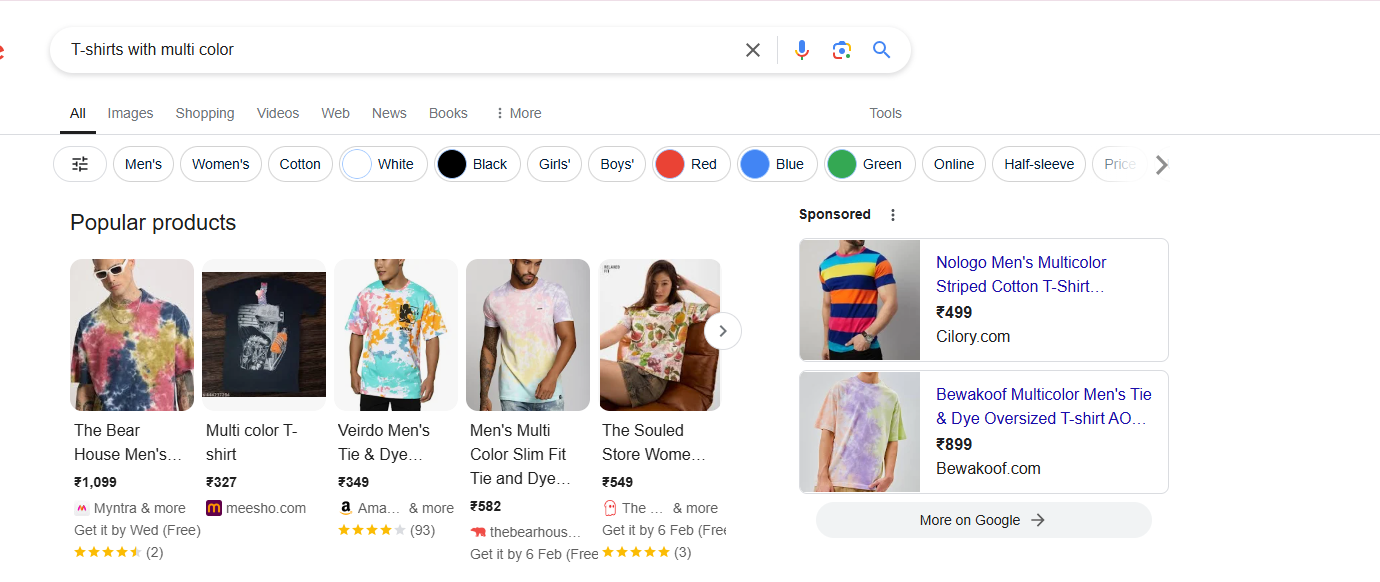
Take a look at this snapshot! Google pulls in these color swatches automatically, thanks to the ColorSwatch schema we implemented. It’s a must-have for your website to display every color option and make your products irresistible.
7. Offers Schema Type
Festival season is all about finding the best deals, isn’t it? This tag provides details about the product’s price, availability, and offer type, making it easier for users to spot discounts and offers directly in search results.
Imagine seeing the offer price right in the snippet—no need to visit the site to check. Wouldn’t you choose the product with the deal over the one at full price? That’s the magic of the Offers Schema—it gives customers all the pricing info they need upfront.
Refer the Example Code Below:
“offers”: {
“@type”: “Offer”,
“priceCurrency”: “AUD”, // The currency code.
“price”: “29.99”, // The product price.
“url”: “https://example.com/product”, // Link to the product page.
“availability”: “InStock”, // Availability status.
“priceValidUntil”: “2025-01-31”, // Expiration date for the price offer.
“itemCondition”: “NewCondition”, // Condition of the product (e.g., New, Used).
“seller”: {
“@type”: “Organization”,
“name”: “Example Store” // Name of the seller.
}
}
Live Result Example:
- Search Result: “A$29.99 – In Stock” visible in search results.
- Rich Snippet Appearance: Displays the price with availability and store name.
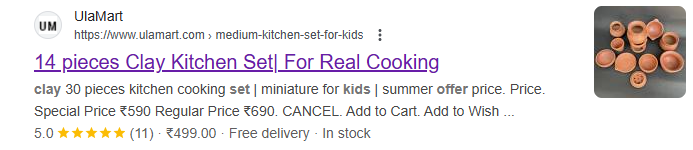
Screenshot 1:
Screenshot 2:
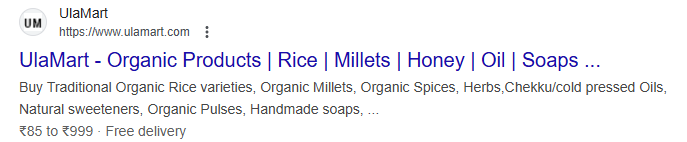
In the comparison above, the first image clearly displays the offer price details, providing customers with immediate and valuable information. In contrast, the second image fails to mention the offer price or discount percentage, leaving users guessing. This difference highlights the significance of using the “offers” schema tag on your website.
What Our Clients Say
“Thanks to their SEO expertise, my website now attracts global traffic. Breaking into the global market felt daunting, but their smart strategies made it possible. A game-changer for Ula Mart Organic Products!”
— Abarna, Co-founder, UlaMart
8. brand Schema Type
The Brand schema type is used to define and showcase specific brand-related information about a product or service. This helps search engines understand and display your brand prominently in search results, which can enhance visibility and build trust with potential customers.
Imagine you’re searching for a “premium smartwatch.” In the search results, you notice a product listing with the brand name “TechLux” clearly displayed alongside the product details. The listing stands out because it shows not only the name but also other relevant brand information, like the logo or a brief tagline.
By implementing the Brand schema, search engines can display this information directly in the search snippet, making your product more identifiable and credible to customers. This is particularly useful for e-commerce sites where brand recognition plays a huge role in influencing purchase decisions.
Refer the Example Code Below:
“brand”: {
“@type”: “Brand”,
“name”: “Titan” // The name of the brand or manufacturer.
}
Live Result Example:
- Search Result: “Titan” shown in search results below the product name.
- Rich Snippet Appearance: Brands may be visible in search snippets.
Example Snapshot
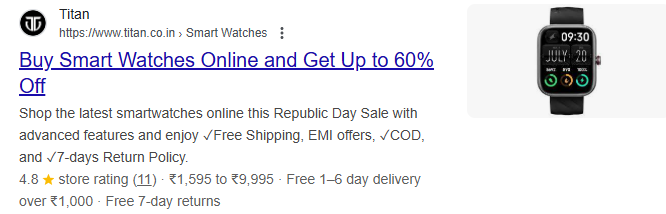
The above screenshot gives a clear understanding of how the Brand Schema tag works on websites. Here, you could see the brand name “Titan” along with all the essential details of the product, providing customers or consumers with the information they need directly in the search snippet. This highlights just how important it is to implement this schema tag on your website.
9. Image Schema Type
We’ve got all the schema tags to provide detailed product information on our e-commerce website. But is just updating the details enough to fully satisfy a customer? Absolutely not! People trust what they see, right? That’s where the Image Schema tag comes in—it helps showcase product images in search snippets, building trust and convincing customers to click and explore further.
Refer the Example Code Below:
“image”: “ueirorganic.com/cdn/shop/files/topsellingtag_21.png?v=1685776812&width=1080” // Direct URL to the product image.
Having an Image Schema tag ensures that search engines can identify and display relevant product images directly in search results. This not only grabs attention but also significantly boosts the click-through rate (CTR).
Live Result Example:
- Search Result: Product images appear as part of the rich snippet.
- Rich Snippet Appearance: Search engines display the product image along with price and description.
Screenshot 1:
Screenshot 2:

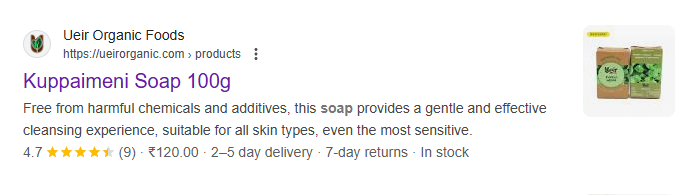
Here, In the first picture, you’ll notice that there’s a clear image of the product, making it visually appealing to potential customers. On the other hand, the second picture lacks a product image, which can make it less engaging. This highlights how crucial the “image” schema tag is for boosting your website’s performance, especially when it comes to SEO.
10. Expiration Date Schema Type
Every customer wants the products they buy to be safe, healthy, and effective. While we provide detailed product information and visually appealing images, what about the product’s shelf life? Knowing the expiration date is just as important.
As responsible business owners, it’s our duty to ensure we offer not only quality products but also the necessary details to use them safely. The Expiration Date Schema helps us provide the exact expiration date, making customers aware and confident in their purchase decisions.
Fix Your Schema Setup
Refer the Example Code Below:
“expirationDate”: “2025-12-31” // The date the product will expire.
This tag helps inform consumers about the expiration date, especially for perishable goods. It’s particularly useful for online grocery and health product e-commerce.
Live Result Example
- Search Result: Expiration details may appear in some search results for perishable items.
- Visibility: This might not appear in rich snippets but can be used to build trust with customers.
11. Additional Type Schema Type
Imagine you’re selling a set of organic handmade soaps on your e-commerce website. The primary schema type might categorize it as “Product.” While this is accurate, it doesn’t provide much detail about the specific kind of product it is.
By using the additionalType tag, you can specify the product even further, such as “OrganicProduct” or “HandmadeSoap.”
Refer the Example Code Below:
{
“product”: {
“@type”: “Product”,
“name”: “Wireless Headphones”,
“category”: “Electronics”,
“additionalType”: “http://www.productontology.org/id/Headphones”
}
}
When a customer searches for “Headphones” this added specificity makes it easier for search engines to recognize your product as highly relevant to the search.
12. Material Schema Type
The Material schema tag specifies the materials used to make a product, helping customers make informed decisions, especially if they have preferences or concerns about the materials used or sustainability.
To Explain it More Realistic
Imagine you’re searching for a comb online. As you browse the search results, you notice one listing that stands out: “100% natural, made of high-quality neem wood.” Doesn’t that catch your attention more? You’re likely to click on that, right?
That’s exactly what the Material schema tag does—it lets you provide details about the materials used in your products. By clearly stating that the comb is made from sustainable, high-quality neem wood, you not only attract more customers but also appeal to those who care about the materials used in the products they buy.
Refer the Example Code Below:
“material”: “100% natural, made of high-quality neem wood.” // The material used to make the product.
The Material schema tag helps showcase important details about a product’s composition, making it easier for customers to find exactly what they’re looking for, especially if they have a preference for eco-friendly or high-quality materials.
Live Result Example
- Search Result: “Made from 100% Natural Wood” may appear beneath the product title in some search engines.
- Rich Snippet Appearance: This tag may not always show directly in rich snippets, but it helps enhance the product description in search engines and can be visible on your website.
13. Negative Notes Schema Type
Every product has its positive and negative features. While we naturally want to highlight the positives, as business owners, we must be transparent about both to maintain customer trust and ensure their safety.
Think about it—by showcasing a product’s potential negative points, you demonstrate honesty and build credibility with your customers. If a customer sees a negative note about your product, like a warning or limitation, before they purchase, they will appreciate the transparency.
For example, a skincare product may have a “Negative Notes” schema tag stating, “May cause irritation for sensitive skin.” This alert helps customers make informed decisions.
Refer the Example Code Below:
“negativeNotes”: [
“Limited size range”, // A specific drawback of the product.
“Requires frequent maintenance” // Another specific issue.
]
This tag highlights the product’s weaknesses or features that customers might not like. It’s essential for balancing the review and offering transparency.
Live Result Example
- Search Result: These negative points generally won’t appear directly in search results but can be featured on product pages. They can help customers prepare for any downsides before purchase.
- Visibility: Typically appears on the product page, in reviews, or as part of user-generated content. It won’t be shown in rich snippets.
14. Positive Notes Schema Type
Each product has its own set of benefits right? So, as a seller, it’s important to emphasize these strengths to attract potential buyers. The Positive Notes schema tag allows you to highlight the product’s key features, providing customers with a clear understanding of its best qualities.
For instance, let’s say you’re selling a premium yoga mat. By using the Positive Notes schema tag, you can highlight features like, “Non-slip surface for better grip,” “Eco-friendly material,” or “Extra thickness for added comfort.” These details directly tell customers what makes the product worth their investment.
Refer the Example Code Below:
“positiveNotes”: [
“Soft and comfortable to wear”, // Comfort factor for a clothing product.
“Durable and long-lasting”, // Durability for a tool or appliance.
“Eco-friendly materials” // Environmentally conscious design.
]
Why It Matters?
While negative notes build trust through transparency, positive notes create excitement and attract attention. By showcasing the strengths of your product, you’re helping customers quickly identify its value. When customers see exactly what makes your product special, they are more likely to make a purchase.
Just as negative notes keep customers informed and build trust, positive notes help spark interest and excitement. It’s all about creating balance—showing the good while being transparent about the bad. This builds a stronger connection with your customers and helps them make confident, informed decisions.
Live Result Example:
- Search Result: Positive attributes, like “Durable and long-lasting” may be visible in search snippets.
- Rich Snippet Appearance: Search engines may display these benefits, especially if you have user reviews or product ratings visible in the snippet.
15. Alternate Name Schema Type
The Alternate Name schema tag is designed to define and represent alternative names for a product. This becomes especially helpful when a product is known by different names in various regions or languages.
Imagine someone from Telangana is searching for a product like Kuppaimeni bath soap from Tamil Nadu. While Tamil speakers may instantly recognize the name, a Telugu-speaking customer might search for it as Indian Nettle Leaf Soap. Without an alternate name, search engines might not connect these terms, making it harder for customers to find the product.
Refer the Example Code Below:
“alternateName”: [
“Kuppaimeni Bath Soap”, // Alternative name used to describe the product.
“Indian Nettle Leaf Soap” // Another way customers may refer to the product.
]
Why It Matters?
Using this tag ensures your product is discoverable globally, no matter how it’s referred to. By including alternative names, you’re not just catering to a wider audience—you’re also improving search accuracy and user experience.
For example:
- Primary Name: Kuppaimeni Bath Soap
- Alternate Name: Indian Nettle Leaf Soap
With this tag, customers can find your product using the name they’re familiar with, ensuring they don’t miss out just because of regional or language differences. It’s a simple yet powerful way to bridge the gap and connect with customers worldwide.
Live Result Example:
- Search Result: Depending on the search terms used by customers, “Kuppaimeni Bath Soap” could be displayed in the snippet.
- Rich Snippet Appearance: This tag isn’t typically visible in search results but improves product visibility via alternative search terms.
Screenshot 1:

Screenshot 2:
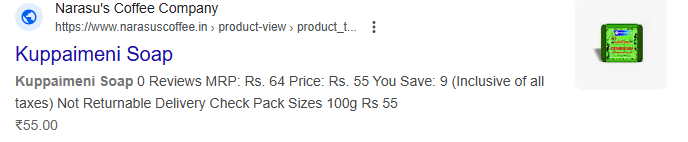
In the first picture, you can see that they’ve implemented the correct schema tag, which is why the alternate name of the product is clearly displayed. On the other hand, the second picture lacks this crucial detail because the schema tag hasn’t been applied. This demonstrates the importance of using the “alternateName” schema tag for better visibility.
16. Review Schema Type
The Review Schema tag is designed to display customer feedback directly in the search snippet. This can include the number of reviews, ratings, and even detailed comments from previous customers.
Imagine you’re searching for a product online, and you see two search results:
- One with no reviews or ratings.
- Another showing “4.5 ⭐⭐⭐⭐⭐ (250 reviews).”
Which one would you trust more? Obviously, the one with reviews! This tag builds trust and credibility, encouraging new customers to click and explore your site.
Refer the Example Code Below:
{
“@context”: “https://schema.org”,
“@type”: “Review”,
“itemReviewed”: { “@type”: “Product”, “name”: “Example Product” },
“reviewRating”: { “@type”: “Rating”, “ratingValue”: “4.5”, “bestRating”: “5” },
“author”: { “@type”: “Person”, “name”: “John Doe” }
}
Live Result Example:
- Search Result: “⭐⭐⭐⭐⭐ (148 reviews) | ‘The pieces are so beautiful and lovely, they’re worth the price and very satisfied with the products :)’ – Shriya Simran Pradhan”
- Rich Snippet Appearance: Display of the review ratings and snippets of the review text in search results can increase click-through rates.
The Review Schema tag is your gateway to gaining more clicks and growing a loyal customer base—because who doesn’t trust a product loved by hundreds of others?
Live Result Example:
- Search Result: “5 stars (200 Reviews)” could appear beneath the product title in Google search results.
- Rich Snippet Appearance: Display of the review ratings and snippets of the review text in search results can increase click-through rates.
17. Shipping Schema Type
Shipping information helps customers understand delivery options and costs directly from search results.
Imagine you’re buying a product online. Before clicking on a site, wouldn’t you want to know:
- How much does the shipping cost?
- How long will it take to reach you?
- If free shipping is available?
When this information is shown upfront, it saves time and builds confidence in your buying decision.
Refer the Example Code Below:
{
“@context”: “https://schema.org”,
“@type”: “Product”,
“name”: “Womens Casual Kurthi”,
“shippingDetails”: {
“@type”: “OfferShippingDetails”,
“shippingRate”: “0”,
“shippingMethods”: [“Standard Shipping”, “Express Shipping”],
“shippingCharge”: “Free”
}
}
Screenshot 1:
Screenshot 2:
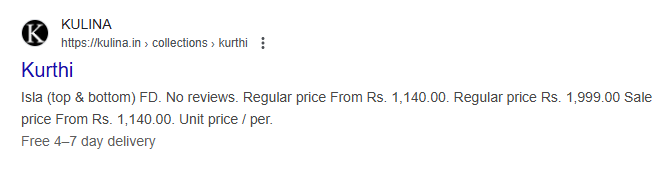
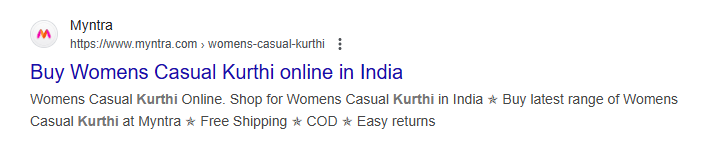
The above screenshots perfectly illustrate the importance of the Shipping Schema tag.
In the first example, the snippet clearly mentions “Free Shipping,” while the second example provides no shipping details at all. So, which one would you choose? The first one, of course!
When customers see shipping information upfront—especially something as enticing as “Free Shipping”—it builds trust, saves time, and encourages them to click through to your site. This small detail can make a big difference in improving customer engagement and conversions.
18. Country of Origin Schema Type
The Country of Origin Schema tag adds another layer of transparency by showing where a product comes from.
Imagine This: A customer sees a product they’re interested in but wants to know its “birthplace” before making a decision. Is it locally made, imported, or from a specific country known for high-quality products? That’s where this tag comes in—it acts like a birth certificate for the product!
Why It’s Useful:
- Builds Trust: Customers often associate quality with certain countries, and knowing the origin can influence their buying decision.
- Encourages Local Support: Highlighting a product as “Made in [Country]” can attract customers who prefer locally made goods.
- Saves Time: Customers don’t need to dig through product details—this information is available right in the search snippet.
Refer the Example Code Below:
“@context”: “https://schema.org/”,
“@type”: “Product”,
“name”: “Neem Wood Comb”,
“brand”: {
“@type”: “Brand”,
“name”: “UlaMart”
},
“offers”: {
“@type”: “Offer”,
“price”: “25.00”,
“priceCurrency”: “INR”
},
“manufacturer”: {
“@type”: “Organization”,
“name”: “UlaMart Organic Store”
},
“countryOfOrigin”: “India”,
“description”: “Crafted in India | Authentic Neem Wood Comb”
Live Result Example : For example, a snippet that says, “Crafted in India | Authentic Neem Wood Comb” is more appealing than one without any origin information. Adding this schema tag ensures customers have all the essential details, making their purchase decision easier and faster.
19. Has Certificate Schema Type
The Has Certificate Schema tag is all about building trust and credibility. It highlights certifications associated with a product, such as quality, safety, or eco-friendly certifications, directly in the search snippet.
Let’s Paint a Picture:
Imagine you’re shopping for an organic skincare product. You find two options. The first mentions certifications like “USDA Organic” and “Cruelty-Free” in the search snippet, while the second provides no such information. Which one would you trust more? The certified product, right?
Why It Matters:
- Authenticity: Certifications act as proof of quality and compliance with industry standards.
- Customer Confidence: When customers see certifications like ISO, FDA-approved, or eco-friendly labels, they’re more likely to trust and choose the product.
- Competitive Edge: Highlighting certifications in search snippets sets your product apart, making it stand out in a crowded market.
Refer the Example Code Below:
“@context”: “https://schema.org/”,
“@type”: “Product”,
“name”: “Organic Cotton Ear Swabs”,
“brand”: {
“@type”: “Brand”,
“name”: “UlaMart”
},
“hasCertificate”: {
“@type”: “Certificate”,
“name”: “Certified Organic”,
“issuer”: {
“@type”: “Organization”,
“name”: “Agricultural and Processed Food Products Export Development Authority (APEDA)”
}
Live Result Example: A snippet reading, “Certified Organic | Eco-Friendly Packaging | Dermatologically Tested” will immediately capture attention and build trust, encouraging users to click and explore further. The Has Certificate Schema tag ensures these key details are front and center!
20. Category Schema Type
The Category Schema Tag is a powerful tool that helps define and classify products into specific categories, making it easier for search engines to understand the content and present it to the right audience.
Example in Action:
Let’s say a customer is searching for “sports shoes.” Using the Category Schema Tag, a product can be classified under “Footwear > Sports Shoes > Running Shoes.” This structured categorization ensures the product shows up for relevant search terms, improving its visibility and making it easier for customers to discover.
Without this tag, the product might end up lost among unrelated search results, reducing its chances of being clicked on. So, adding the Category Schema Tag is a small step that can make a big difference!
Refer the Example Code Below:
“@context”: “https://schema.org/”,
“@type”: “Product”,
“name”: “Wireless Noise-Canceling Headphones”,
“brand”: {
“@type”: “Brand”,
“name”: “SoundMax”
},
“category”: “Electronics > Audio > Headphones”,
“description”: “Premium wireless noise-canceling headphones for immersive sound quality.”
Live Result Example: Search snippet displaying: “Wireless Noise-Canceling Headphones Category: Electronics > Audio > Headphones Brand: SoundMax – Experience premium sound with noise cancellation.”
🚀 Breakdown of Tags
- SKU: A unique identifier for the product used for tracking and inventory management.
- Aggregate Rating: Displays the average rating and review count, helping users evaluate the product’s reputation.
- PriceCurrency and Price: Defines the product’s price and the currency it’s sold in (AUD in this case).
- HasMerchantReturnPolicy: Contains information about the store’s return and exchange policies, including a URL link to the policy details.
- PriceValidUntil: Specifies the expiration date of the current pricing offer.
- ColorSwatch: Provides visual representations of the color options available for the product.
- Offers: Contains details of the product offer such as price, availability, and the seller’s information.
- Brand: Identifies the brand that manufactures or sells the product.
- Image: URL to the main image of the product.
- AdditionalType: An additional category or classification for the product, in this case, specifying the product as a type of “Clothing.”
- Material: Describes the material used in the product, which is “100% Organic Cotton” for this example.
- NegativeNotes: Specifies the product’s drawbacks or limitations, like a limited size range.
- PositiveNotes: Highlights the positive features of the product, such as its comfort and eco-friendliness.
- AlternateName: Provides other common names or synonyms for the product, improving searchability.
- Review: Includes individual customer reviews, including the rating and review body.
- ExpirationDate: Specifies an expiration date for the product, often used for time-sensitive or limited-edition items.
🚀 How these tags enhance live search results
- SEO Impact: Tags like material, positiveNotes, negativeNotes, and alternateName can help improve a product’s SEO by making it more discoverable through relevant search terms.
- Rich Snippets: Reviews, positiveNotes, and aggregateRating can be shown as rich snippets directly in the search results, making your product stand out with star ratings, review counts, and detailed product attributes.
- Customer Trust: Tags like review and negativeNotes promote transparency. Customers are more likely to trust products that provide both positive and negative aspects, along with actual user experiences.
By including these tags, you’re not only helping your product rank better on search engines but also giving users the necessary information to make confident purchasing decisions.
🚀 How to Implement Schema Markup
- Use Google’s Structured Data Markup Helper: A tool to generate JSON-LD code.
- Add the Code to Your Website: Include the schema markup in your HTML or CMS editor.
- Test Your Markup: Use the Google Rich Results Test Tool to validate your schema.
- Monitor Performance: Track improvements in search visibility and CTR using tools like Google Search Console.
Implementing schema markup on your e-commerce website is a game-changer for SEO and user engagement. By using product, review, offer, and other schema types effectively, you can create rich snippets that attract more customers.
Start with the examples provided and see how schema can transform your e-commerce strategy today!
Fix Your Schema Setup
📖Helpful Guides & Resources
👉 How to Build an E-commerce Platform for Arts and Crafts
👉 How to Build a Stationery Store E-commerce Website Online
👉 9 Key Steps on How to Create an E-commerce Website for Exotic Pets
👉 Present Perfect: Setting Up Your Online Gift Emporium in 10 Steps.
👉 Building Your Online Aquarium: Website Creation Tips and Tricks

